Too many places to read
Documentation, source code, Git changes, PDFs, and notes often send you through several apps and repeated navigation.
A reader for files on your computer
Local Reader App lets you browse folders on your Mac or Windows PC from a focused browser view. Read documentation, source code, Git changes, images, and PDFs together. Optional AI Chat is available on supported setups and is never required for reading.
Why it helps
You should not have to upload a repository or rearrange its folders just to read it. Open the original files locally, and use AI Chat only when you choose to.
Documentation, source code, Git changes, PDFs, and notes often send you through several apps and repeated navigation.
Uploading files to another service creates another copy that must be refreshed, governed, and trusted.
Before using AI, you should be able to see which repository is active, what information is included with the request, and whether the tool can write.
Inside the app
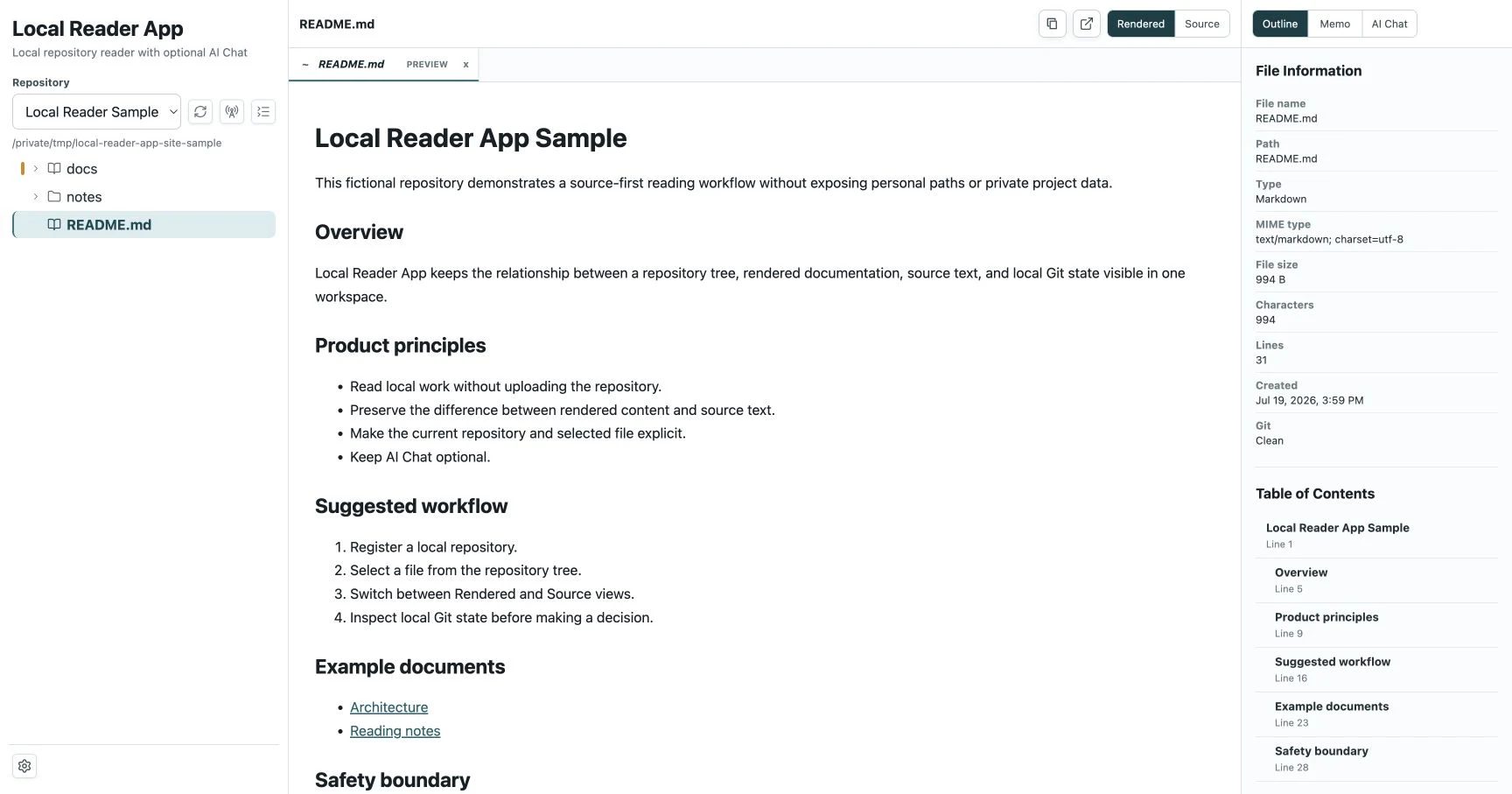
Use the file tree on the left, read the selected file in the center, and check its outline and file information on the right.
Open Markdown, HTML, source code, YAML, text, images, PDFs, and supported DOCX files that contain Markdown. Switch views when you need to compare the formatted result with its source.
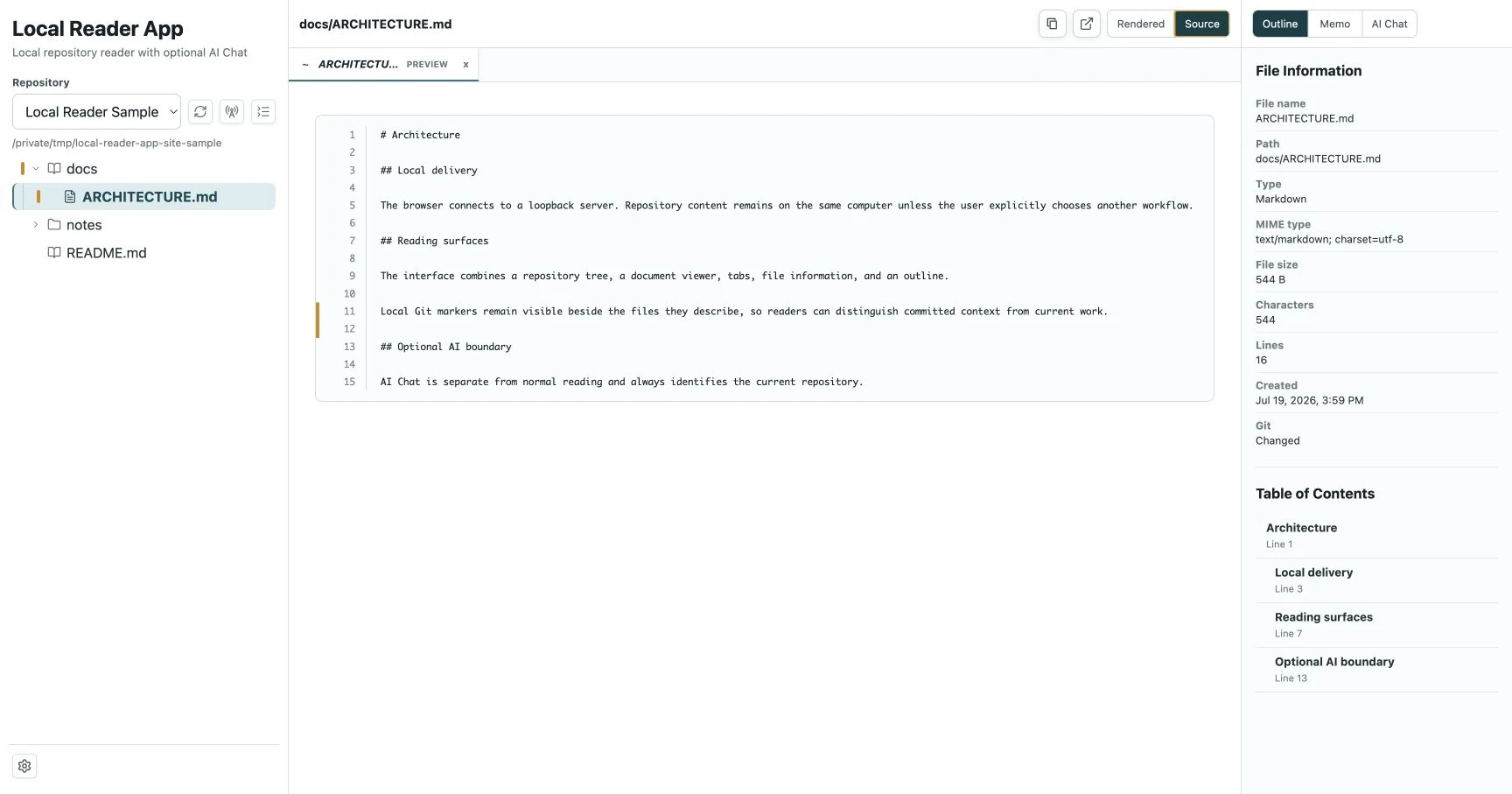
The file tree marks new and changed files. Source view shows line numbers and highlights changed lines, while the right panel shows the selected file's Git status and outline.
Getting started
The reader works without an AI account, API key, or uploading files to an online service.
Choose one or more folders by absolute path and set any exclusions. The app rejects duplicate or overlapping folders.
The app starts on your computer and displays the registered files at a local browser address.
Activate a supported CLI, confirm the Current repo and the files included at the start, and review the working-tree diff after any AI run that can change files.
Reader features
Move through folders, read supported files, and check related details without turning the browser into a general-purpose file editor.
Register one or more folders and browse each file tree without flattening its structure.
Read Markdown, source code, text, images, PDFs, and supported DOCX files with a view suited to each format.
Keep references open while allowing quick previews to follow the current selection.
Jump between headings and check the path, type, size, line count, and local Git status.
Draft notes during the browser session and download them only when you want to keep them.
See new and changed files in the tree and changed lines in Source view.
Open a supported file at a short-lived local URL in a separate browser tab. It is not a public sharing link.
Adjust text size, light or dark appearance, code wrapping, and workspace width.
Optional AI Chat
AI Chat is separate from normal reading. Supported CLI options use their own sign-in, and the app confirms that they are ready before allowing them to work with the Current repo. The reader itself does not require AI.
Local Reader App can start a supported CLI's sign-in flow, but it does not collect or store the resulting credential.
The app shows the models, reasoning settings, and supported speed choices reported by the authenticated CLI.
The send area shows the files and rules included at the start of the request. A supported CLI may still inspect other files inside the Current repo.
Your selected CLI and model, setup status, conversations for each repository, and draft message can return after you reload the same tab. Credentials are not stored, and the app checks the CLI again before the next request.
Normal viewing does not edit registered folders. Supported CLI options are write-capable after activation and may change multiple files, so review the actual diff before keeping the result.
CLI AI Chat is unavailable on Windows in this version. Claude Code support is implemented and covered by automated tests, but it has not yet been verified with a live Claude account.
Safety and privacy
Normal reading uses files on your computer. Optional features are separated so you can see when content may contact another service or when a tool can write to the Current repo.
The app opens at 127.0.0.1 by default and is used from a browser session on the computer where it is running.
Normal viewing stays within registered folders. The app rejects attempts to open files outside them, as well as duplicate or overlapping folder locations.
The app shows Git information from your computer and does not fetch from Git remotes automatically.
Repository Settings writes only the app's configuration file. A supported, explicitly activated CLI is the exception for the Current repo.
Treat AI output as a suggestion. You remain responsible for checking the requested scope, the working-tree diff, and anything you decide to keep or publish.
Rendered Markdown and HTML may load HTTPS images referenced by the file. Use a plain-text editor first if any network request is unacceptable.
Open source
The public GitHub repository contains the source code, installation guides, issue tracker, and project policies.
Read local files without uploading them first
Explore the public repository, review the current features and limits, and install Local Reader App from source when it fits the way you work.